

Case study: launching BookForge on Google Play
What it took to build a hands-free writing app with AI tools, cloud sync and subscriptions, and get it live on Google Play.
BookForge is my own product, not a client job. It's a hands-free writing app: authors dictate their book by voice, and the app helps them plan, write, revise and export it. It's live on Google Play with paid subscriptions, and an iPhone version is on the way.
I'm sharing how it was built because it covers almost everything a client app needs: speech-to-text, AI features, cloud sync, accounts, subscriptions and the Google Play publishing process. Building it myself, and paying for my own mistakes, is a big part of how I learned to scope client apps properly.

The problem
Plenty of people have a book in them: a novel, a memoir, a family history. What stops most of them isn't ideas, it's the hours of typing and the blank page. I wanted an app where you could talk your book into existence, on a walk or in the car, and still end up with something organised enough to finish and publish.
That meant voice had to be the main way in, not an extra. And the app had to help with the hard parts of writing a whole book, not just record what you say.
What BookForge does
Voice dictation straight into chapters
You speak and the words go straight into the chapter you're working on. Getting this right took a lot of work on the small things: when the microphone starts and stops, what happens when the keyboard pops up, and how edits mix with dictation.
Planning and progress tracking
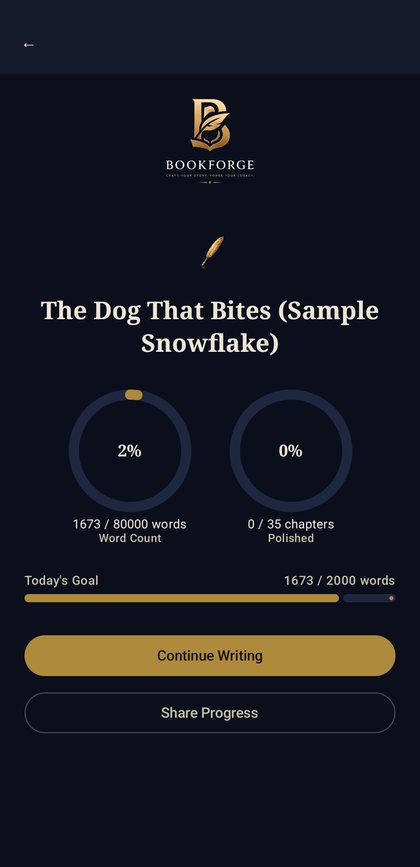
Writers can set word-count goals and see their progress by chapter and across the whole book. Progress rings sound like a small feature, but they turned out to be one of the most motivating parts of the app.
AI writing tools
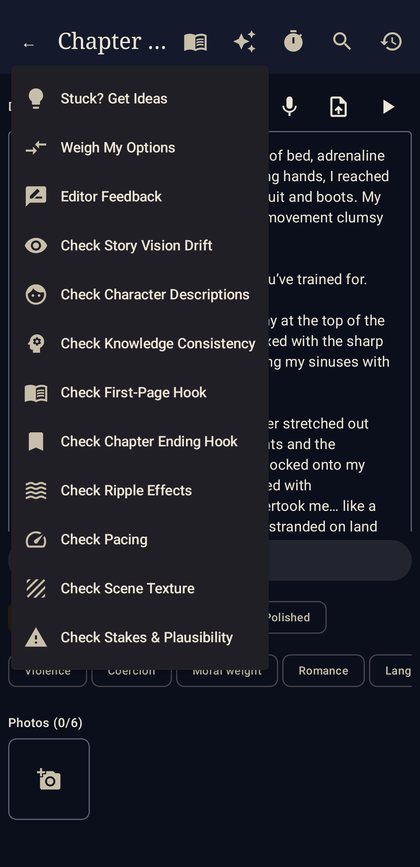
Each chapter has a set of AI tools for idea generation, editor feedback, hooks, pacing and plausibility checks. There are also whole-book checks for repetition, voice, timelines and continuity, the kind of problems that are hard to spot when you've written 80,000 words over six months.
Cloud backup and sharing
Books are backed up to the cloud automatically and synced across phone, tablet and web. Losing a manuscript is a writer's worst nightmare, so this was non-negotiable. Writers can also share a book quickly across all platforms.
Subscriptions
BookForge is paid for by subscription, through Google Play and the web, linked to one account. Whichever way someone subscribes, their access follows them across devices.
How it's built
- Android app first, with an iPhone version and a web version in development
- Speech-to-text for dictation
- A secure server for the AI features. The app never holds private API keys. It talks to my server, which handles the AI requests. That protects the keys, lets me control costs, and means I can improve the AI tools without forcing everyone to update the app.
- Cloud sync and accounts so books follow the writer between devices
- Google Play Billing and web subscriptions, tied to the same account
The secure server is worth highlighting. A common mistake in AI apps is putting the API key inside the app itself, where it can be extracted and abused, and you get the bill. Running AI through your own server is a little more work up front and saves a lot of risk.
What I learned
Beta testers find what you can't
Before launch, I ran closed testing with real writers working on their own books. They found problems I'd never have hit myself: the keyboard covering the text box on some phones, export options they expected but couldn't find, and planning wizards that confused people instead of helping. Every one of those fixes made the launch version better.
Voice apps live or die on small details
Dictation that's 95% right but awkward to correct feels broken. Much of the work went into the moments around speaking: starting, pausing, fixing a word and carrying on.
Billing and store setup take real time
Subscriptions, store listings, testing tracks and policy requirements are a project in themselves. I now build time for them into every app quote, because they always take longer than people expect.
Build once, then go cross-platform
Getting the Android version solid first, then moving to iPhone and web, kept the scope manageable. It's the same staged approach I recommend to clients.
Keep the AI costs visible
AI features cost money every time they're used. Routing them through my own server means I can see exactly what each feature costs, set sensible limits per subscription tier, and switch AI providers if prices or quality change, without touching the app. It's a setup I now recommend for any client app with AI in it.
What it means for your app
Most business apps don't need dictation or novel-writing tools, but nearly all of them share BookForge's foundations: accounts, data that syncs between devices, a server doing the heavy lifting, and often some way of taking payment. Building those properly is most of the work in any app.
If you're planning an app, here's what BookForge taught me to settle early:
- Where the data lives, and what happens if a phone is lost or replaced
- How people pay: app store subscriptions, web payments, or invoicing outside the app
- What runs on your server rather than in the app, especially anything involving AI or private keys
- Which platform comes first, so the first version is solid before it's copied to the others
- Who your beta testers are, and how you'll collect their feedback
Getting those right is the difference between an app that launches smoothly and one that's rebuilt six months later.
Project summary
- Product: BookForge, my own hands-free writing app (bookforgeguild.com)
- Built: Android app, AI writing tools, secure AI server, cloud sync, accounts, Google Play and web subscriptions
- Status: live on Google Play with paid subscriptions; iPhone and web versions in development
Common questions
What is BookForge?
BookForge is a hands-free writing app where authors dictate their book by voice and use AI tools to plan, write, revise and export it. It's live on Google Play with paid subscriptions.
Is BookForge available on iPhone?
Not yet. The Android version is live on Google Play, and iPhone and web versions are in development.
Why does BookForge use its own server for AI?
So no private API keys are stored in the app. The server handles AI requests securely, keeps costs under control and lets the AI tools improve without an app update.
Can you build an app like this for my business?
Yes. BookForge covers voice input, AI features, cloud sync, accounts and subscriptions, which are the same building blocks many business and consumer apps need.
Thinking about building an app?
I build apps for Android, iPhone and the web, including AI features, cloud sync and subscriptions. Small business apps start from $1,650 including GST, and bigger products start with a $2,200 Feasibility & Scoping Sprint that's credited to the build.
Tell me about your app